PRODUCTAGENTS & SLACK

Fixes startin your editor.

Your coding agent pulls a finding over MCP, proof of concept included, and patches it where you already write code. Tag @Trident in Slack and it answers from your live findings.

Works with

01HOW IT WORKS

From a findingto a draft PR.

Ask your agent to fix what Trident found. It pulls the finding, patches the code and proves the fix before it opens the PR.

01

Findings over MCP

Your agent lists open findings and pulls one with its proof of concept.

02

Patched where you code

Claude Code, Cursor and Copilot make the change in your repo.

03

Proven before the PR

The proof runs as a test, so the draft PR only opens when it passes.

02YOUR AGENT

Works with the agentyou already use.

One MCP server, the same two tools, in whichever agent your team already writes code with.

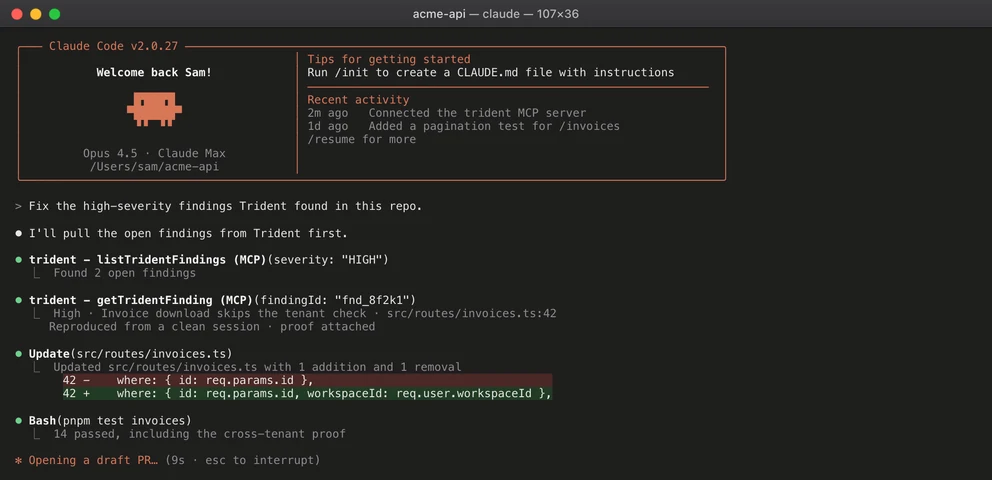
  • Claude Code

    Pulls the finding over MCP, patches the file and runs the tests in your terminal.

    Claude Code running Trident's MCP tools on acme-api
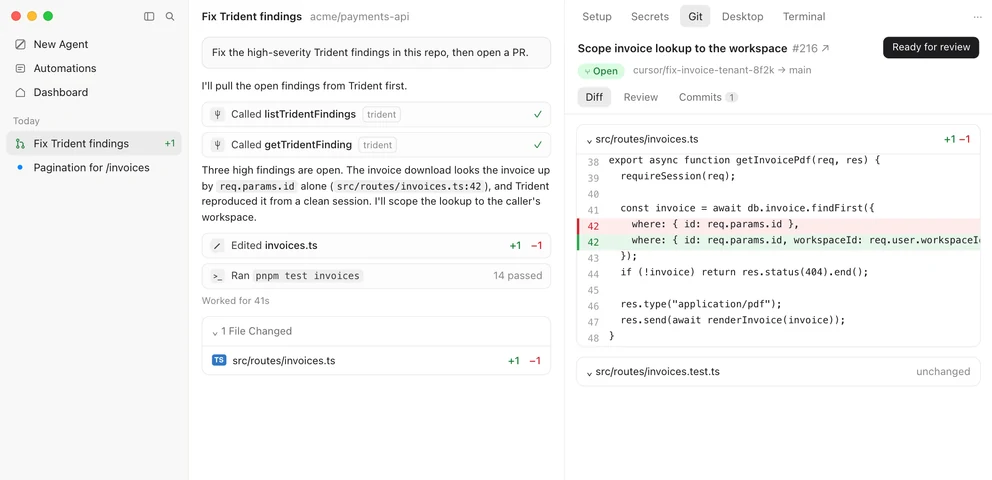
  • Cursor

    The same Trident tools in Cursor's agent, with the change ready to review.

    Cursor running Trident's MCP tools on acme-api
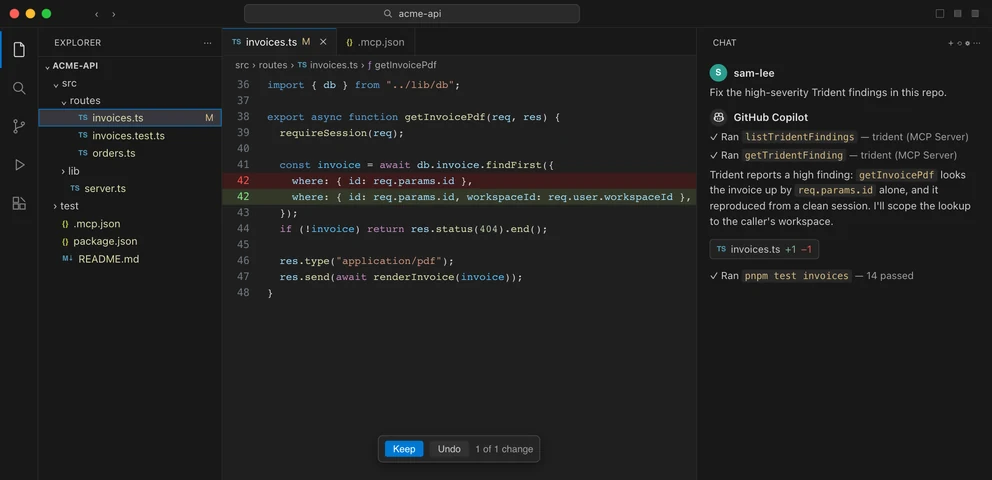
  • Copilot

    Agent mode in VS Code calls Trident and edits the file inline.

    Copilot running Trident's MCP tools on acme-api
  • Codex

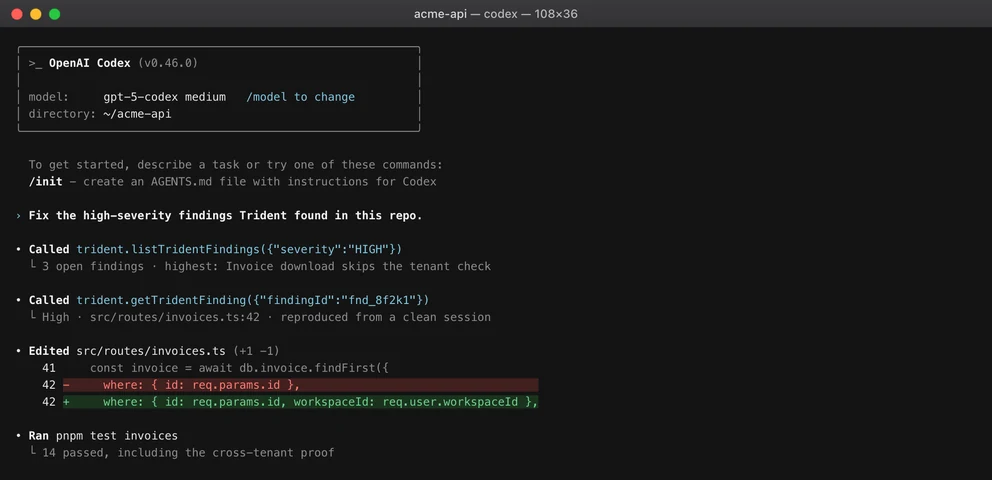
    The Codex CLI pulls findings from Trident the same way.

    Codex running Trident's MCP tools on acme-api

trident connect

also sets up

  • Windsurf
  • Cline
  • Roo
  • Junie
  • Warp
  • Kiro
  • Gemini
  • Amp
  • Grok
  • OpenCode
  • Zed
  • Continue
  • Goose
  • Devin
  • Capy

03SLACK

One mention,a straight answer.

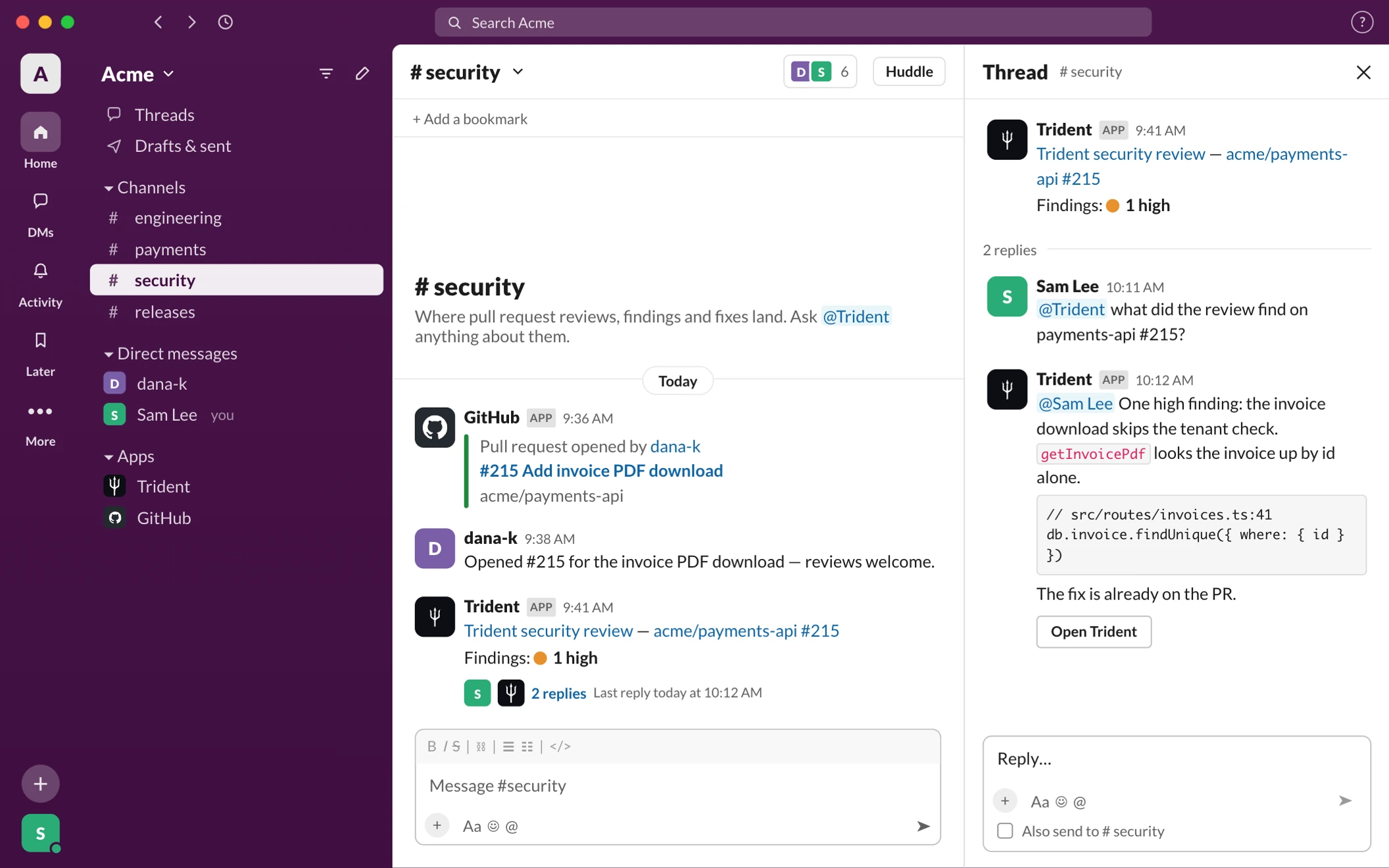
Tag @Trident in any channel and it answers in the thread from your live findings, scans and PR reviews.

Slack #security: Sam Lee asks @Trident what the review found on payments-api #215, and Trident answers in the thread with the finding, the code and an Open Trident button
  1. Any channel

    Mention @Trident wherever the question comes up.

  2. From live data

    Answers come from your current findings, scans and PR reviews.

  3. Straight to the proof

    Every answer links back to the finding in Trident.

Or file itas a ticket.

Send a finding to Linear or Jira. The ticket is titled with its severity and carries the finding id, so it traces back to Trident.

  • Linear

    Set Linear as the project's tracker and file any finding as an issue.

    Linear issue filed by Trident: [Trident · HIGH] Invoice download skips the tenant check
  • Jira

    Or file to a Jira project, with the severity, category and description.

    Jira work item filed by Trident: [Trident · HIGH] Invoice download skips the tenant check

04SET UP

Three commands,then ask your agent.

Install the CLI, sign in and connect. Trident wires every coding agent on your machine to one MCP server.

  1. 01

    Install the CLI

    One package for login, connect, findings and fix.

    npm i -g @trident-ai/cli
  2. 02

    Sign in

    Opens your browser and signs you in to your organization.

    trident login
  3. 03

    Connect your agents

    Finds the coding agents on this machine and shows every change before it writes one.

    trident connect
  4. 04

    Ask for the fix

    Your agent pulls the finding over MCP and gets to work.

    Fix the high-severity Trident findings

05FAQ

Questions,answered.

Still have a question?

BOOK A DEMO

Claude Code, Cursor, Copilot in VS Code and Codex, plus other MCP clients. They all connect through one remote MCP server.

In any channel. Tag @Trident and it answers in the thread from your live findings, scans and PR reviews, with a link back to the finding.

No. The MCP server signs you in with OAuth on the first tool call, so no key goes into a config file. trident connect writes nothing until you confirm.

Yes. Linear and Jira are both Trident integrations, so a finding can be filed where your team already tracks work.

Your findings. It lists the open ones and pulls a finding with its proof of concept, so the fix can be proven before the PR.

Yes. Start a free trial, and your first verified findings land within a day of connecting.

[06]GET STARTED+

Fix it whereyou write code.

Run trident connect, then ask your agent for the fix. Each finding arrives with its proof of concept.

  • SOC 2 audited by Sensiba LLP
  • No key in your config